手册 v0.1.0 · KaiderBooks v2.0.0 · 2026-07-20
Compliance calendar and reminders
In one sentence
Record every client's filing deadlines once, read the month off a calendar, and let a few reminder rules do the chasing — no mental notes, no spreadsheet.
1. The compliance calendar: what is due this month
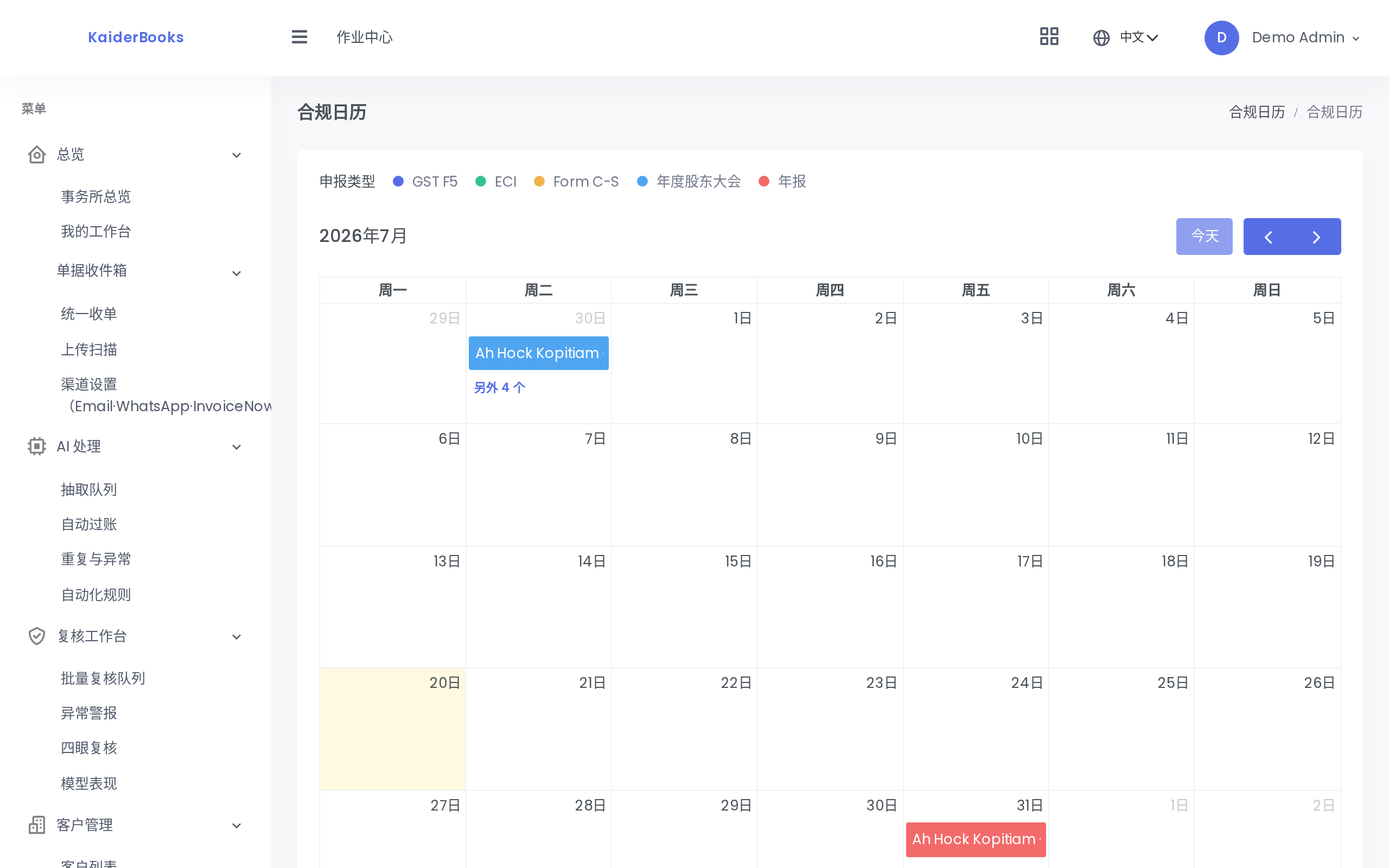
The calendar lays every client's filing deadlines out by month. Three GST filings on one day, a lone annual return on another — you can see the shape of the month at a glance and staff it accordingly.
Every entry on the calendar comes from the filing deadline list below it. The calendar displays; the list is where you maintain.
2. Maintaining the filing deadline list
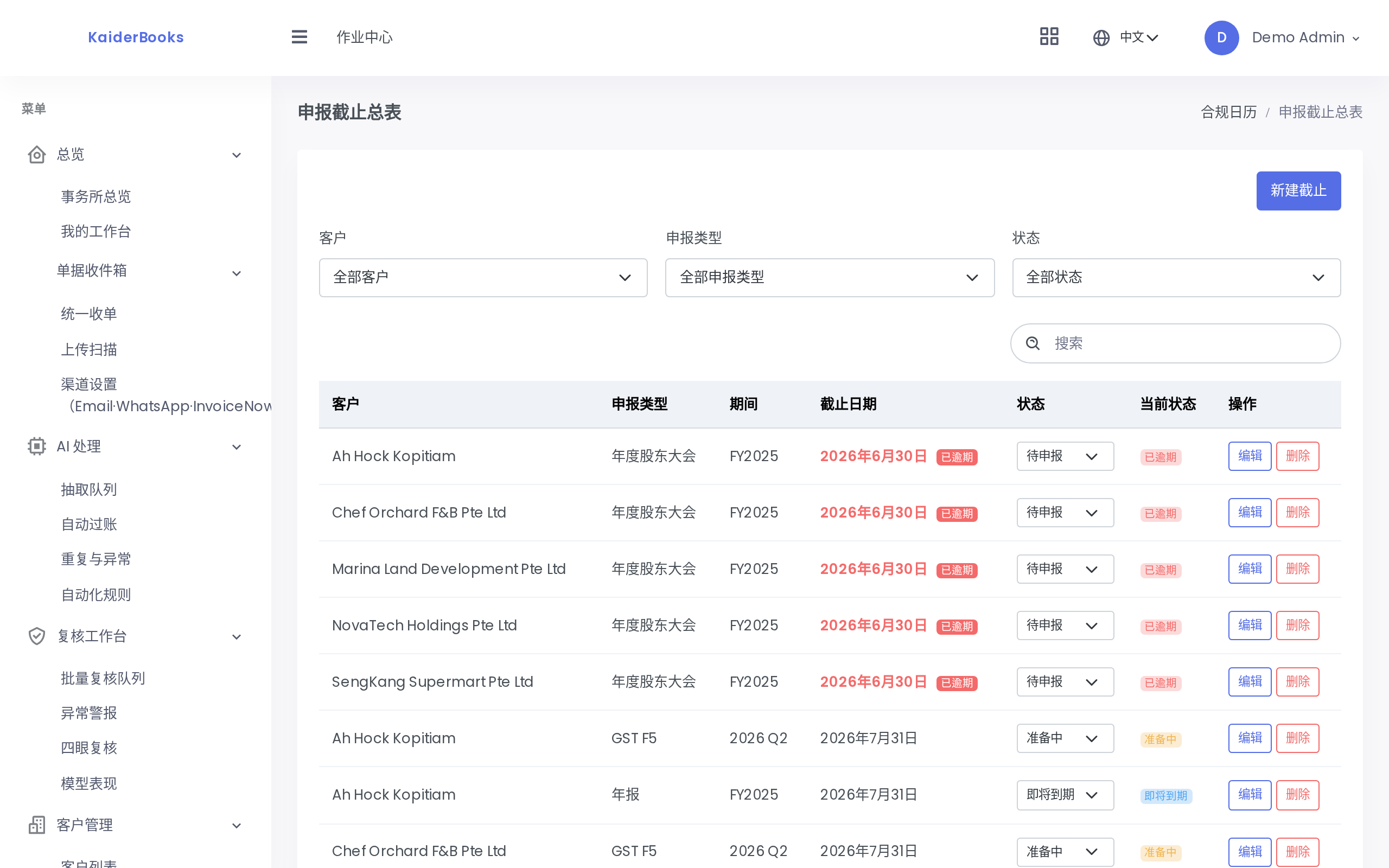
| Field | Notes |
|---|---|
| Client | Fixed once saved (disabled when editing). Picked the wrong one? Delete and re-create |
| Filing type | GST F5 / ECI / Form C-S / AGM / Annual return / XBRL / CPF |
| Period | Free text — name the period clearly, e.g. 2026 Q3, FY2025 |
| Due date | The statutory deadline; it drives the calendar and the overdue flag |
How the status moves
Each record carries one of four statuses, and the list gives every row a dropdown you can change in place — no need to open the edit dialog:
| Status | When to use it |
|---|---|
| Upcoming | Just recorded, nothing started |
| Preparing | Gathering records, doing the books |
| Ready | Figures complete, waiting to submit |
| Filed | Submitted |
Any row past its due date that has not reached Filed shows a red "Overdue" badge. Those are what to work on first.
The three filters at the top stack: filter by client to see what one company still owes, by filing type to see how far this GST round has progressed, by status to pull out everything overdue.
How this relates to actually filing
These statuses are an internal progress marker for your firm — changing the status does not submit anything. The real submission happens in the Filing subsystem (see GST and filing). Once submitted, come back and set this record to Filed.
3. Reminder rules

Reminder rules are cards, one rule per filing type.
| Field | Notes |
|---|---|
| Filing type | Which filing this rule watches |
| Days before | 0–365. Enter 7 to be reminded a week before the deadline |
| Channels | Email / WhatsApp. At least one is required — with neither ticked, submitting does nothing |
| Recipients | Separate multiple entries with commas |
Each card has an enable toggle in its corner. To stop a class of reminder temporarily, switch it off rather than deleting the rule — turn it back on later and the configuration is still there.
Deleting a rule has no confirmation
Delete on a card takes effect immediately, with no confirmation dialog. Once the configuration is gone you have to retype it, so if you only mean to pause a rule, use the toggle.
4. A workable routine
- When you take on a client, record the whole year of deadlines in one sitting — four GST quarters, ECI, Form C-S, the annual return — and stop thinking about it.
- Set the lead time per type: seven days is plenty for a GST return you can file as soon as the books are closed; allow 30 for something like Form C-S that waits on audit and adjustments.
- Scan the calendar every Monday and assign the week's work (a matching task on the task board works well).
- Update the status as soon as you file. The overdue badge is only useful while red always means genuine trouble; a screen full of filed-but-not-updated rows destroys the signal.
Next: Administration →